

Description
Realistic Radio Control for Your B737 Home Cockpit
Bring realistic B737 radio operation to your desktop flight simulator with the SimOnSolution B737 Radio BOX Plug&Play.
This compact, standalone radio control unit combines communication, navigation and transponder functions in one integrated desktop enclosure.
Designed for both beginners and experienced flight simulation enthusiasts, the Radio BOX provides realistic physical controls, illuminated displays and seamless integration with supported flight simulation software.
Radio BOX Configuration
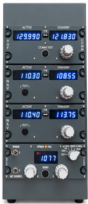
The unit includes four fully functional radio panels:
- 1× COM (VHF Communication Radio) – Active and standby frequency displays, frequency transfer, rotary frequency selection and test function.
- 2× NAV (Navigation Radios) – Independent NAV radio panels with active and standby frequency selection, transfer buttons and test functions.
- 1× ATC / Transponder – Transponder code selection, mode selector, IDENT button and additional ATC controls.
Main Features
- B737-inspired radio panel design.
- Fully functional buttons, switches and rotary encoders.
- Illuminated digital frequency displays.
- Adjustable panel backlighting for realistic cockpit illumination.
- Integrated COM, dual NAV and ATC/Transponder functionality.
- Compact, freestanding desktop enclosure.
- Single USB connection to your PC.
- External 12V power supply.
- Dedicated SimOnSolution software for hardware integration.
- Plug&Play operation with supported flight simulators.
Flight Simulator Compatibility
The B737 Radio BOX is compatible with:
- Microsoft Flight Simulator 2020 – PMDG 737 and iFly 737.
- Microsoft Flight Simulator 2024 – PMDG 737 and iFly 737.
- X-Plane – Zibo 737.
The unit operates using dedicated SimOnSolution software, developed to provide communication between the physical radio panels and supported aircraft.
Simple Plug&Play Installation
Connecting your Radio BOX is quick and straightforward.
Only two connections are required:
- USB cable – Connects the Radio BOX to your PC.
- 12V DC power supply – Powers the unit, displays and backlighting.
Both the USB cable and 12V power supply are included with the product.
What’s Included
- 1× B737 Radio BOX Plug&Play
- 1× USB connection cable
- 1× 12V power supply
- SimOnSolution software for supported aircraft
The Perfect Addition to Your Desktop Simulator
Whether you are building a new B737 simulator or upgrading your existing setup, the B737 Radio BOX offers a practical and realistic solution for managing communication, navigation and transponder functions.
Enjoy the convenience of physical radio controls without relying on mouse clicks or on-screen cockpit interaction.
SimOnSolution – Hardware for Simmers.